
.png)


You cannot control Google's results directly. You can strongly influence what appears for your name by building, claiming, and maintaining the pages Google draws on, and by using the tools Google provides for privacy, knowledge panels, and autocomplete. Google assembles a name-search page from many sources, including your own sites, social profiles, news coverage, images, videos, and increasingly an AI summary, so the practical goal is to make the most authoritative and accurate pages about you the ones available to rank. The work has six levers: own a home base, complete your profiles, earn independent coverage, claim your knowledge panel if one exists, use Google's tools for what qualifies for removal or reporting, and monitor what shows up, including what AI says. At Status Labs, we use these levers to help people shape their first page, and the order matters, because each lever supports the next.
This guide explains who decides what appears, which parts you can control and which you cannot, and the step-by-step plan we use.
KEY TERM, name-search results page: the page Google assembles when someone searches a person's name, which can include standard links, images, videos, news, a knowledge panel, related searches, and an AI summary.
What shows up when someone Googles my name, and who decides?
Google's automated systems decide, and you influence the inputs. The page can combine standard links, a knowledge panel, images, videos, news, related searches, and an AI-generated summary at the top. The summary now reaches a large audience. Pew Research Center's June 2026 report found that 60 percent of U.S. adults say they read the AI summaries at the top of search results.
Google's May 2025 guidance on its AI search experiences says the long-standing advice carries across to them: provide unique, valuable content, a good page experience, and pages Google can access, and support text with high-quality images and video. For your name, that translates into pages about you that are accurate, complete, easy to crawl, and backed by other credible sources.
What can I control, and what can't I?
You control the pages you own, and you influence everything else. This table shows where each element of a name search falls and the best lever for it.
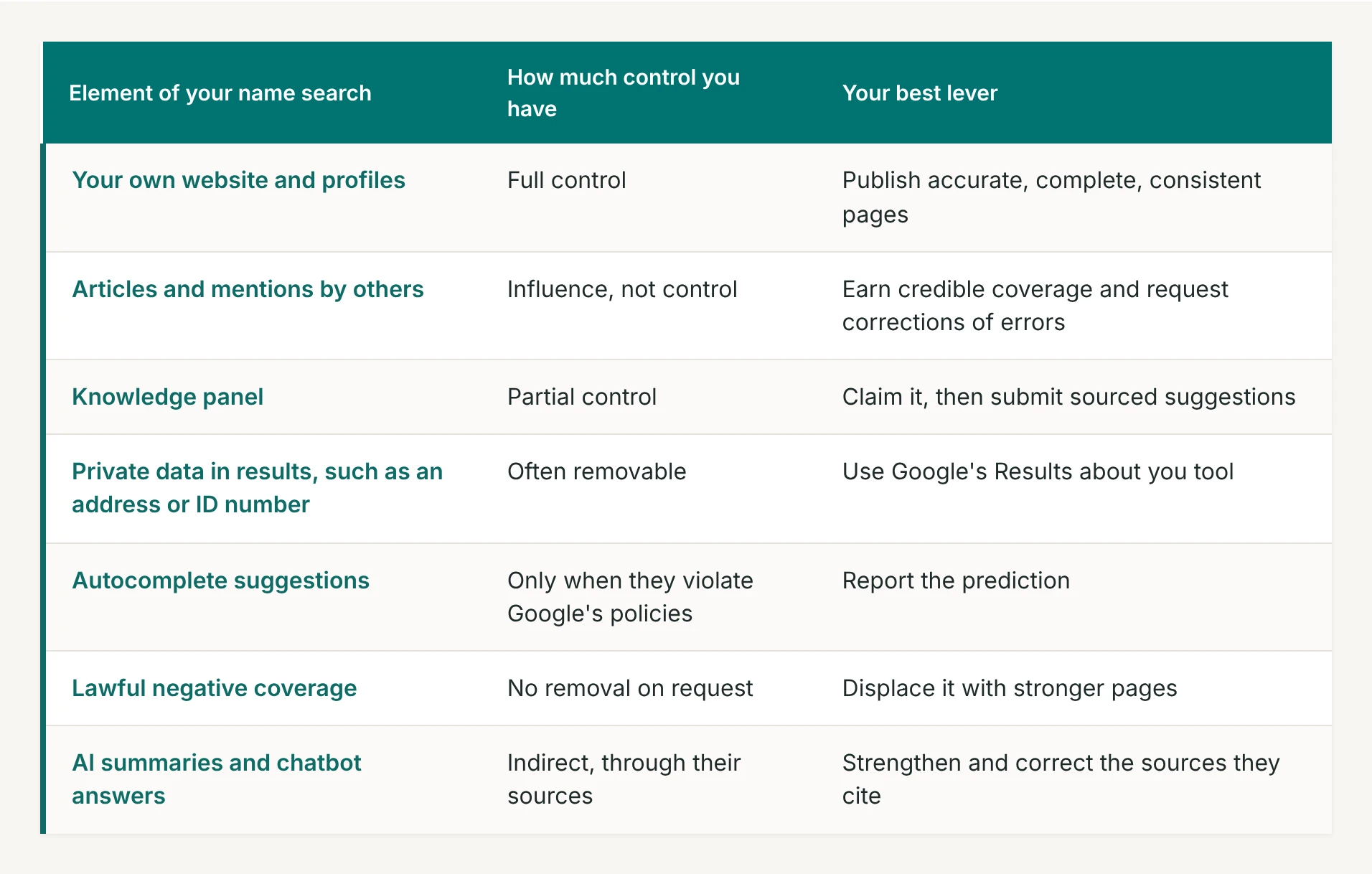
The pattern is simple. The more an element depends on pages you publish, the more control you have, and the more it depends on others, the more your strategy has to rely on influence.
How do I build the first page I want?
Work through the sequence below, because each step strengthens the next.
- Capture your baseline. Search your full name in a private window and save the first two pages, the autocomplete suggestions, the related searches, and any AI summary, with the date. Our audit guide covers the details.
- Publish a home base. A personal website with a clear biography, credentials, dated work, and contact details gives Google one authoritative page that you control. Our executive pages guide explains how to structure it.
- Complete and align your profiles. Use the same name, title, biography, and photo on LinkedIn and the other professional platforms where you appear, so Google can connect them to one person.
- Earn independent coverage. Expert commentary, bylined articles, interviews, and speaking pages add credible third-party results for your name.
- Claim your knowledge panel if one exists. The next section explains how.
- Use Google's tools for what qualifies. Request removal of exposed personal data and report autocomplete predictions that violate Google's policies.
- Monitor monthly. Repeat the baseline search, including the major AI tools, and keep a dated record of what changes.
This sequence is the core of our personal reputation management work.
Can I claim or create a Google knowledge panel?
You can claim one if it exists, and you cannot order one. Google's help page on knowledge panels explains that panels are sourced automatically from across the web and update as information on the web changes. If you are the subject of a panel, you can claim it and suggest changes, and anyone else can submit suggestions through the feedback link.
Claiming follows Google's verification process. Google notes that not all panels are claimable at present, and that you update, correct, or remove information through the feedback option, so a claim gives you a channel and not control. Because Google builds panels from web sources, the way to influence one is the same as the rest of this plan: accurate pages that you own, backed by credible coverage elsewhere.
How do I handle private data and negative autocomplete suggestions?
Use Google's own tools for the categories they cover. Google's Results about you tool monitors Search for your phone number, home address, and email address, and since February 2026 it also finds government ID numbers such as passport, driver's license, and Social Security numbers. You request removal from the same dashboard. Google notes that removing a result from Search does not remove the page from the web.
For suggestions that appear as you type your name, Google lets you report inappropriate predictions that you believe violate its autocomplete policies. In our experience, suggestions that reflect real searches and break no policy tend to stay, so the lasting fix for those is more authoritative content about you.
What do I do about results I cannot remove?
Displace them. Lawful news coverage, reviews, and public records generally stay, and the practical answer is to build and earn stronger pages that outrank them and push them lower. Our guide on how to suppress a negative article walks through that process, and the plan above supplies the pages that do the work.
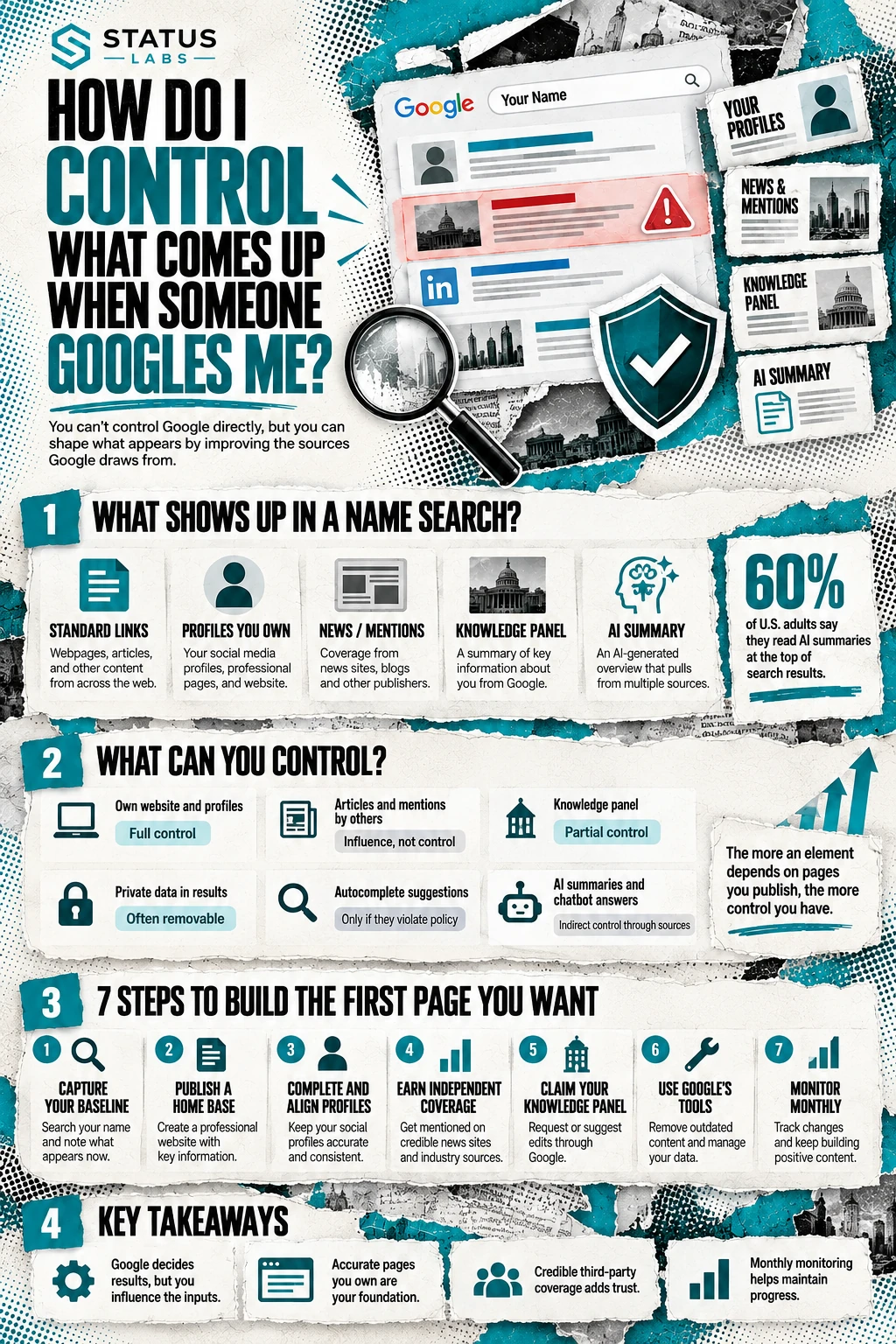
AI summaries and chatbot answers draw on the same web sources, so strengthening and correcting those sources improves what AI says as well. Our 2026 whitepaper explains how we read and shape those answers for clients.
Frequently asked questions
Can I make Google show only positive results about me?
No. Google's systems decide what appears, and lawful negative coverage generally stays. You can build stronger, more authoritative pages that rank above it, which changes what most people see first.
How long does it take to change what Google shows for my name?
Expect months. New pages need time to be crawled and trusted, and earned coverage accumulates gradually. The timeline depends on your starting point, how common your name is, and how entrenched any negative results are, and we give a range after the first audit.
Can I remove my name from Google entirely?
No. Google's tools cover specific categories, such as exposed personal contact information and government ID numbers, and mentions of your name in lawful content generally remain. Removing a result from Search also leaves the page itself online.
Do I need a knowledge panel?
Not necessarily. Google creates panels automatically when its systems have enough reliable information about a person. Building a strong, consistent presence supports one, and a panel is a bonus and not a requirement for a good name search.
Why does my name search look different on another device?
Results can vary by location, device, and signed-in state. We capture the page in a private window and repeat it from a second device to see the neutral version.
Can an agency control what Google shows about me?
No agency controls Google. A good partner audits your results, builds the pages and coverage that influence them, and monitors the changes. We explain how this works on our YouTube channel.
The bottom line
You cannot control Google's results, and you can shape them by owning a home base, completing your profiles, earning independent coverage, claiming your knowledge panel if one exists, using Google's tools for private data and policy-violating suggestions, and monitoring the results, including AI summaries, on a schedule. The more an element depends on pages you publish, the more control you have, and the plan puts your effort where it counts.
If you have not searched yourself recently, do it today: open a private window, search your full name, and save the first two pages with the date. That record shows which of the levers above matters most for you.
.png)

.png)
